The Better Marketing Blog
Better tips, tools, and tactics for the AI era.
Better tips, tools, and tactics for the AI era.
Most AI tools are great at talking—but not always at telling the truth.
They generate plausible-sounding content, not verified facts. And if you’re a marketer, that’s a problem. You need more than ideas: you need reliable insights, current data, and citations you can trust.
Perplexity’s Comet might become your new best friend.
Comet is a new AI-powered browser from Perplexity. It’s built on Chromium (like Google Chrome and Microsoft Edge), so if you are using one of these browsers, switching is quick and seamless.
If you’re used to using AI tools like ChatGPT or Claude, Comet’s interface will be familiar, but it functions differently.
Comet is a bold hybrid that combines the browsing power of Chrome with the intelligence of an AI platform—adding context, citations, and speed to your workflow.
Introducing Comet: Browse at the Speed of Thought
If you’re using Chrome for research and ChatGPT for writing, you’re already doing better than most. But you’re still doing more manual work than you need to.
Chrome is great at opening tabs—but it doesn’t analyze or summarize anything.
Comet, on the other hand, actively reads the pages you visit, summarizes key points, and provides clickable citations for every insight.
It’s an AI that works right alongside your research—an intelligent assistant that pulls in real-time information and keeps your findings grounded in source-backed truth.
Here’s how Comet compares to Chrome on typical marketing tasks:
So, which AI platform is better? It depends on the task.
Because Comet is the first of its kind, it still feels like a work in progress, with some users saying that some of its features aren’t working quite as expected yet.
Here’s how Comet’s AI features compare with ChatGPT.
The good news is, you don’t have to choose between them. For most people, the smarter move is to combine both.
Use Comet for research, analysis, and validation.
Use ChatGPT for outlining, writing, and reworking your ideas.
Because you can access the ChatGPT model from within Comet, you may find that you can seamlessly use both for different tasks.
Beyond browser basics, what makes Comet truly useful are the features built into its core. These aren’t just technical bells and whistles—they’re practical tools that align with the everyday tasks that marketers face, from competitor research to trend analysis.
For example, Comet offers:
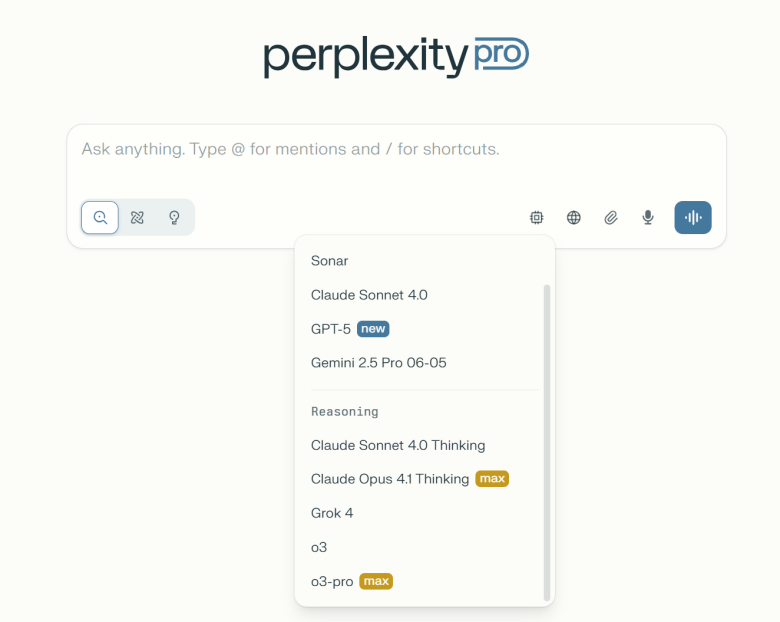
Comet interface with model menu open.
Comet gives you access to the latest models of ChatGPT-5, Claude, Gemini, and more—all within a single interface. This means you can toggle between models to get different types of insights without switching platforms.
For marketers, this flexibility is powerful for:
Another key to Comet’s usefulness is its Assistant mode. Comet’s assistant lives in your browser sidebar. As you browse, it reads the content alongside you—offering instant summaries, suggested follow-ups, and clickable citations.
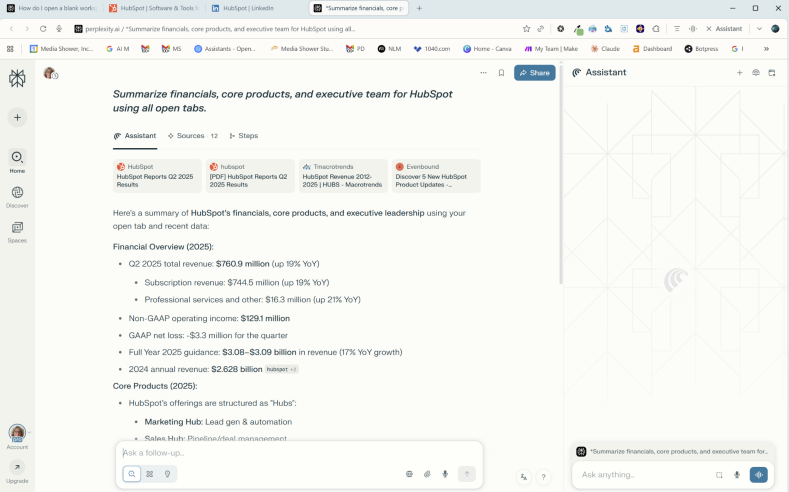
Comet’s assistant works alongside your conversations.
You’re never left guessing where a stat came from, or flipping between pages to verify something. It’s seamless, real-time support.
Opening and closing the assistant is as easy as clicking a single button. The two buttons to its left allow you to instantly summarize the current web page or launch voice mode.
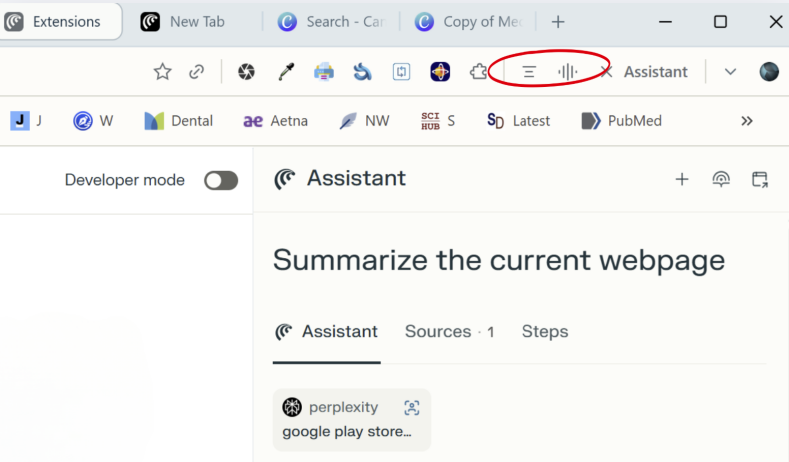
Summarize this web page and Launch voice mode tools.
In Comet, when you ask a complex question—like comparing competitors, following links, or summarizing multiple sources—Comet automatically enters autopilot mode.
Comet’s agent gets to work to complete your task for you. It can:
You don’t need to turn anything on. If your task is complex enough, Autopilot just kicks in to perform multi-step tasks—while you work on something else.
Comet includes seamless connectors for Gmail, Google Calendar, Slack, and other productivity tools—with no extensions needed. The first time you ask your assistant to do a task using an external app, it will ask you for your sign-in information.
Once you grant permission through a secure login, you won’t have to do it again. You can ask the assistant to summarize emails, schedule meetings, or create calendar events using natural language. It all happens directly in the sidebar, with no extra setup.
Comet lets you reference content from other open tabs using the @tab command—no copying, pasting, or losing context.
If you have three competitor websites open, you can write:
“Compare the messaging in @tab1, @tab2, and @tab3. Summarize their core positioning.”
Comet will scan those tabs, analyze the content, and return a unified response. This is particularly powerful for marketers comparing tone, value props, or product positioning across multiple sources.
We scanned the web for user and reviewer opinions. We found mixed opinions, with a general consensus that Comet has some exciting features. However, some users felt that those features didn’t always work as expected.
Here’s what reviewers liked about Comet:
One of the more common dislikes we found was that Comet uses a lot of resources and can strain some systems. We found this to be true.
Here’s the whole list:
Sources:
Note: AI tools are evolving so quickly that many of the potential issues discussed here may have been addressed by the time you read this.

Below are 12 use cases that show how Comet can slot directly into your marketing workflow—saving time while making your work smarter.
If you’re ready to give Comet a try, you’ll need to have a paid Perplexity Pro account.
Once you’re set up, you can start experimenting with prompts and see how Comet fits into your workflow.

Comet won’t replace your content creation tools—at least, not yet. But it will radically improve how you research, validate, and plan your marketing content—and it will only get better.
If you’re a busy marketer, here’s why Comet is worth exploring:
Want to learn more about Comet? See our frequently asked questions below.
Media Shower’s AI marketing platform is backed by an award-winning creative team. Click here for a free trial.
Comet is an AI-powered browser built by Perplexity. It reads web pages, summarizes what it finds, and gives you answers with clickable sources—all in one thread.
Comet is built for research. It reads the live web and cites its sources, while ChatGPT generates content based on past training data.
Turn on Autopilot, and Comet starts browsing. It visits multiple pages, follows links, and returns a single, clear summary based on what it reads.
Yes. Comet pulls from the live web every time you ask a question, so your answers are up to date and easy to verify.
Absolutely. It’s one of Comet’s best use cases—quick summaries, messaging analysis, and side-by-side comparisons, all with links you can trust.
Perplexity reads the web and shows its sources. It’s not trying to be a chatbot—it’s built to help you find real answers, fast.
Comet can help you explore trends, compare keywords, and gather insights from blogs, forums, and articles. It’s a strong addition to your content workflow.
Comet is available to Perplexity Pro users. It’s a paid feature designed for people who do research every day and want better tools.
Yes. Paste in a URL, and Comet will read the page and give you a summary. It’s quick, clear, and saves a lot of scrolling.
Perplexity is known for source-backed answers. It minimizes guesswork by always showing where information came from.
Editor’s Note: This article is based on our review and publicly available information about Perplexity and Comet as of August 2025. Product features may evolve over time. Always check the official Perplexity site for the latest updates.
Start your free Media Shower trial and get personalized insights on your SEO, competitors, AI visibility, and what to do next.